You’re an RCIC,
not a data-entry clerk.
rcicaxis takes the intake, the sorting, the naming and a 117-point check — you do only the licensed part.
Built with licensed Canadian practitioners running Express Entry files every week
BY THE NUMBERS
What one licensed practice stops doing by hand
117
deterministic checks before you sign
5
passes from raw upload to IRCC template
5 min
unattended build, start to finish
300+
files per client, sorted in one pass
1
portal per client — invite, sign in, upload
0
of it filed without your signature
The problem
You didn’t train to rename PDFs.
Three hundred files per client. Three places the day disappears.
10 hrs by hand→5 min unattended
Sorting files by hand
Normalised, classified and renamed in one pass.
One miss reaches your licence
117 deterministic checks run before you sign.
Chasing client files
One portal per client: invite, sign in, upload.
The solution
Clients upload. The engine sorts, builds and names.
The package lands in your folder. You do only the licensed part.
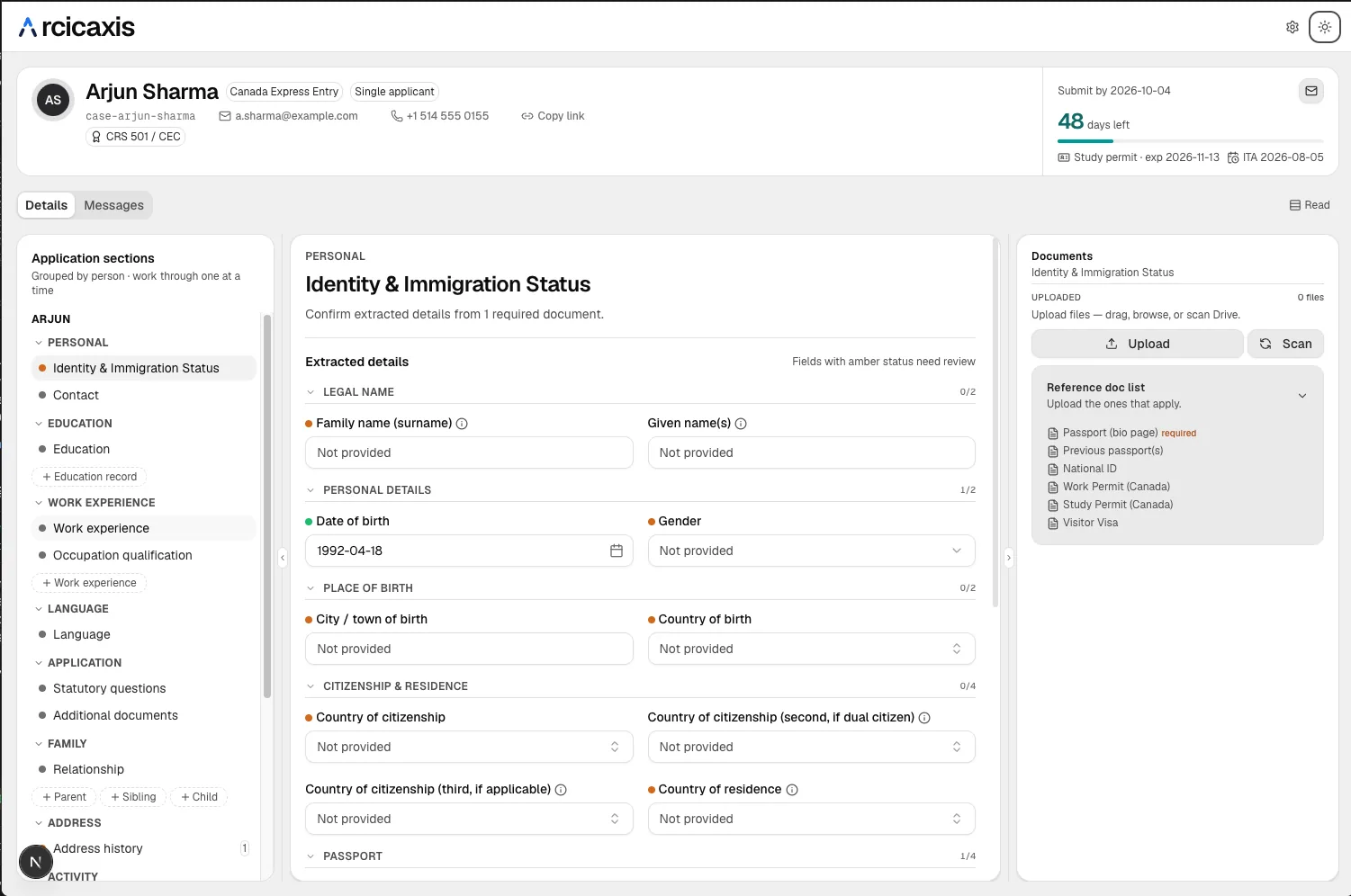
Client portal
They sign in, fill their forms and upload — nothing for you to chase.
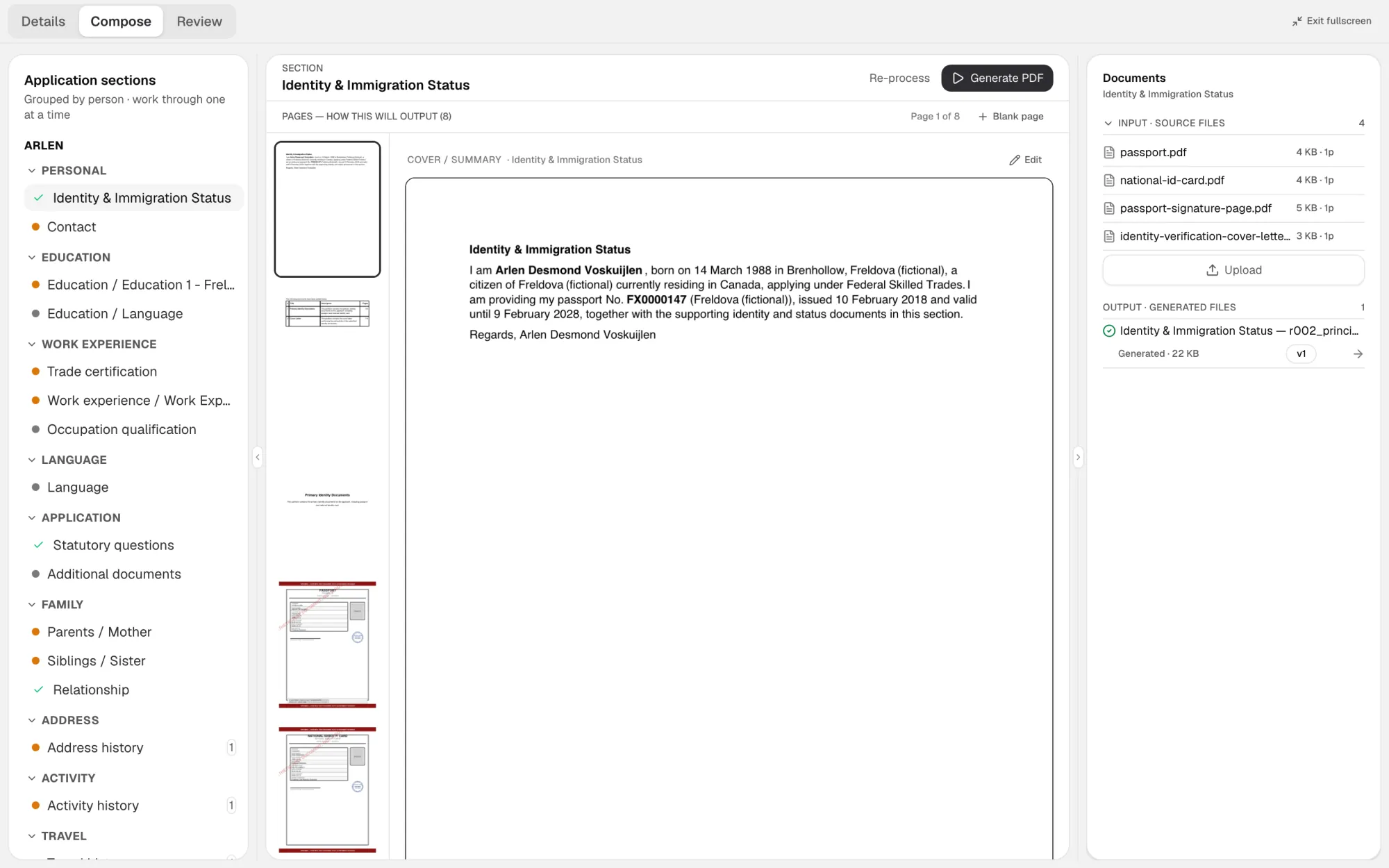
One-click build
Files in, ready PDF out. Runs start to finish in about five minutes.
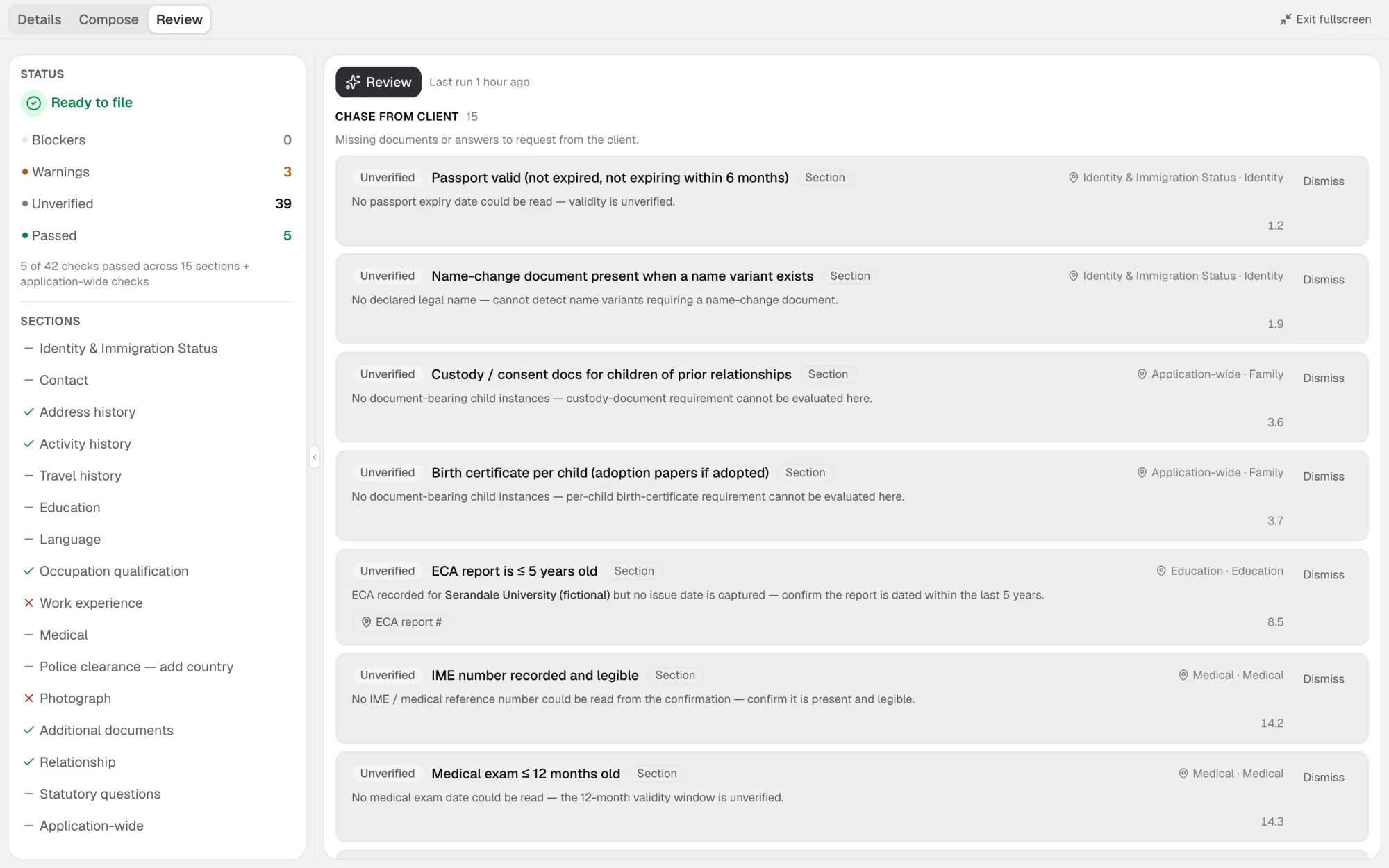
AI review
117 checks on every file before you put your name on it.
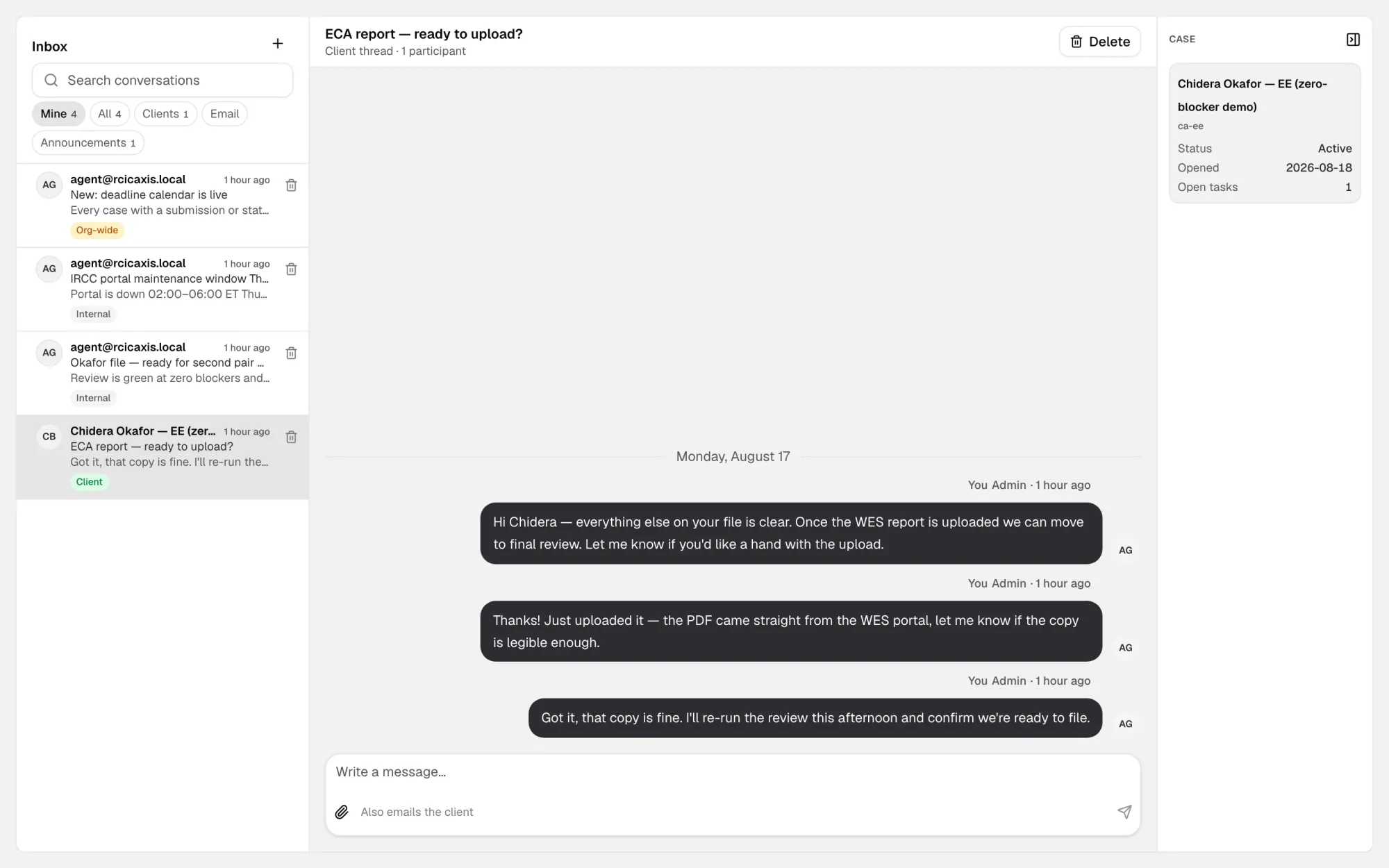
Messages & chat
One thread per case, logged against the file — not in someone's inbox.
How it works
Three chapters. You only appear in the last one.
The engine
One click: files in, IRCC-ready PDF out.
Any file, any format, any order. Five passes, then one PDF arranged into the IRCC template.
- 01
Normalize
HEIC, sideways scans, 40 MB photos — every file becomes a compliant, compressed PDF.
- 02
Classify
Each file is recognised for what it is: passport, payslip, ECA, IELTS, T4.
- 03
Reconcile
24 payslips in random order become a dated series. Gaps are named, not hidden.
- 04
Split
One 60-page scan becomes the separate documents IRCC expects.
- 05
Arrange into the template
Cover page, contents, dividers — one PDF per section, in IRCC order.
In practice
From client upload to signed package
AI review
117 checks run before you put your name on it.
Every file, every date, every cross-reference. Deterministic — the same files give the same answer twice.
- 01
Reads the whole package
Every file, not a sample. In the time it takes to open the folder.
- 02
Checks each file against IRCC rules
Validity windows, required pages, signatures, legibility.
- 03
Cross-references dates and names
Pay periods against the T4. Name variants against the passport. ECA against the transcript.
- 04
Flags only what needs you
Silent passes stay silent. You read the exceptions, not the report.
- Passport validityPASS
- Pay periods vs. T4PASS
- IELTS within validityPASS
- ECA verified by WESPASS
- Name-change document presentNEEDS YOU
Blockers
Missing or expired. The package does not go out until this is fixed.
Needs you
A judgment call. The engine shows you the file and asks.
Silent passes
Checked, fine, out of your way.
Deadlines
Every expiring document on one radar.
Deadlines hiding in folders reach your licence. Here they reach a list.
Tracked per pathway
Every case carries its own e-APR window and status-expiry dates from the day it opens.
Reminders included
Red inside seven days, amber inside fourteen. Nothing depends on someone remembering.
One radar for the office
Every expiring document, every case, one list — sorted by days left.
- Diego Herrerae-APR submission4d left
- Kwame AsanteStatus expiry11d left
- Nadia Petrovae-APR submission23d left
- Hyun-woo ParkStatus expiry41d left
“Built with licensed Canadian practitioners running Express Entry files every week.”
Today → in rcicaxis
What changes on day one.
White-label
Your name on every surface. Ours on none.
Nothing here is a setting you have to remember to switch on. It is how the account is built the day you open it.
The invite
Sends from your address, signed by your firm.
The portal
Your subdomain, your colours, your logo.
Staff console
Your name in the corner, not ours.
The finished PDF
Cover page and dividers carry your brand.
rcicaxis appears on none of them
Security & residency
Built for files you are professionally liable for.
CICC-aligned recordkeeping, with the controls a licensed practice is expected to show.
Canadian infrastructure
Files are stored and processed in Canada. Data residency is not an add-on.
Encrypted throughout
Bank-grade encryption at rest and in transit, on every file and every message.
Readable only by staff on the case
Clients see their own case only. Staff see the cases you put them on.
Never used to train a model
Your clients' documents are your clients' documents. They train nothing.
Who it is for
Licensed practices, whatever the size.
Express Entry today. The same engine, the same review, from one desk to many.
The solo RCIC
You are intake, paralegal and signatory. The engine takes the first two jobs off the desk.
- ·Client portal replaces the chase
- ·One-click build replaces the evening
- ·Review runs while you advise
The small firm
Two to ten staff sharing cases. Everyone works from the same file, the same log, the same radar.
- ·Invite staff, assign cases
- ·Staff-only notes beside client chat
- ·One deadline list for the office
The multi-office practice
Your own subdomain per brand, your own email domain, your own logo on every surface.
- ·White-label per organisation
- ·Clients scoped to their own case
- ·Admin controls who sees what
In development
What we are building next
Not shipping yet — listed here so you know where it is going before you commit to it. Everything above this line is live today.
IRCC autofill
A Chrome extension that fills an IRCC application from the case you already built.
The case is the source. The extension types it into the portal field by field and writes down every value it set, so the fill is auditable afterwards.
- Never submits and never navigates — it fills, you check and file
- Never overwrites a field you have already answered
- Every write recorded against the case
Assignment and sign-off
Who is holding a case, and who has to approve it before it leaves the office.
Hand a case to a staff member, route it back to the licensed consultant when it is ready, and keep the record of who approved what and when.
- Sign-off stays with the licensed consultant
- One approval record per case, on the case
- Staff notes stay staff-only
Ask about either on the walkthrough — we will tell you honestly how far along it is.
Pricing
One plan. Priced per client.
You pay for the cases you actually run — the whole product, every time. No per-seat maths, no metered uploads, nothing held back for a higher tier.
Billed monthly on the clients you have open. Close a case and it stops counting.
Book a walkthrough
- Every member of staff included — no per-seat charge
- Client portal on your own domain
- 117-check AI review on every file
- Deadline rules and reminders per pathway
- Every document in order, as one PDF per section
- Case chat and staff-only notes
15 minutes, on one of your own client folders. You keep the output whether or not you buy.
Want it shaped around your own intake and review flow? That is a one-time build — tell us on the walkthrough.
Straight answers
The questions you were going to ask anyway
Your licence is on every file you sign. Nothing here is worth a vague answer.
What it decides
Your clients
Getting started
Something else? Email us at hello@rcicaxis.com — we reply the same working day.
Ready when you are
Tell us about your practice.
15 minutes, your own files, no slide deck. We come back to you the same working day.